WordPress plugin · free · GPL-2.0
New in v1.1.0 · Internal Link GraphWeFresh SEO Plugin
Spot the content Google forgot — and see exactly how your site links together.WeFresh tracks when every post, page, category, tag and WooCommerce taxonomy was last touched, finds broken links and internal redirects, and now maps your entire internal linking structure as an interactive graph — so you always know what to fix first.
This is the chart WeFresh puts on your dashboard. The red band is your backlog.
What it does
Eight things WordPress does not give you on its own.
Internal link graph
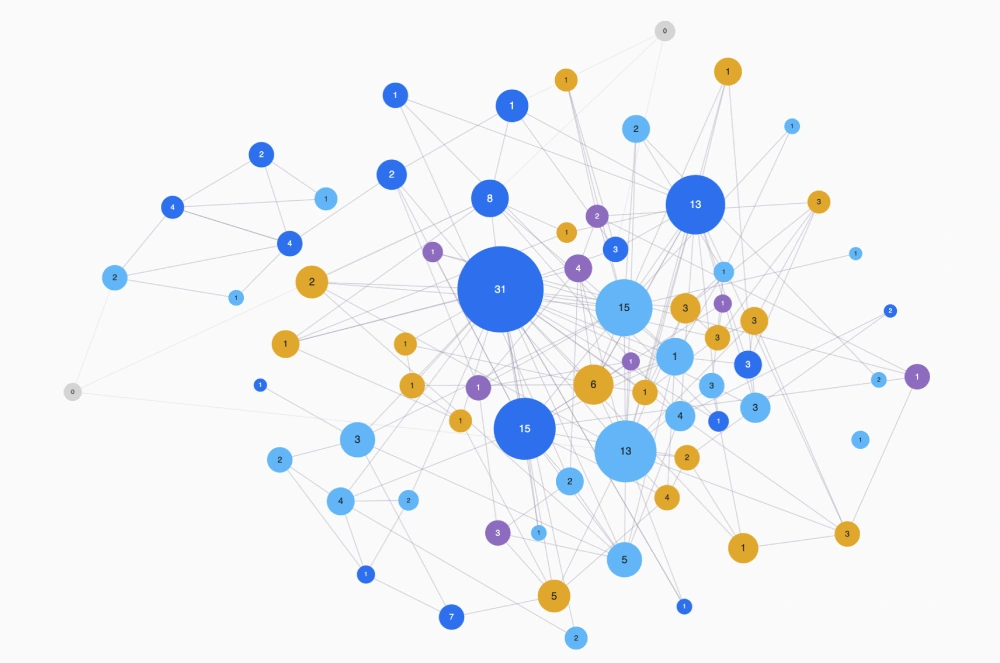
See every page as a node and every internal link as a connection. Pages cluster automatically by how tightly they link together, orphan pages are impossible to miss, and clicking any page shows exactly what links in and out.
Broken-link scanner
Scans the links inside your posts, pages, ACF fields and taxonomy content, then flags internal 404s and redirects — each one grouped by the page you need to edit.
Search Console integration
Upload your Search Console export and see clicks and impressions right next to your orphan pages and stale content, so you know which quiet pages are still quietly bringing in traffic.
Dates for taxonomies
WordPress stores a modified date for posts and pages, but not for categories, tags, product categories or product tags. WeFresh stores them and backfills the ones that already exist.
Search by keyword
Type a keyword and get every matching post, page, category, tag and product taxonomy in one table, sortable by last update.
Internal link counts, fully self-computed
Every incoming and outgoing internal link — for posts, pages, categories and tags alike — is counted entirely by WeFresh's own scan. No dependency on any other SEO plugin.
Noindex stays out
Drafts, private posts and anything set to noindex are excluded. Only pages that are live and meant to rank get counted.
Any content type, automatically
WeFresh detects every public post type and taxonomy on your site, including your own custom ones, so the audit never misses content built outside the box.
See it in action
A short walkthrough of content freshness, broken links, and the internal link graph.
The dashboard reports
Both added to the WordPress dashboard for anyone who can edit others' posts, and gathered together on a Reports page.
Content freshness
Link health
See your internal links as a graph
A visual map of how your content actually connects — built from the same scan that powers the broken-link report.
Every page on your site becomes a node. Every internal link becomes a connection between them. WeFresh lays it out automatically: pages that link to each other pull into their own cluster, weakly-linked pages form a lighter cluster of their own, and true orphan pages, the ones nobody links to, sit outside everything, easy to spot at a glance.
- Colour-coded by content type, so you see how posts, pages and products interlink
- Node size and connection thickness track link count — the most important hubs stand out immediately
- Click any page to see just its connections, while everything else fades out
- Filter out orphans, weak links, or entire content types to focus on what matters
- Save your layout once, and it stays exactly where you left it next time
Install
Requires WordPress 6.5 and PHP 7.4. No other plugin required — internal link counts are computed entirely by WeFresh.
- Download the ZIP and upload it under Plugins → Add New → Upload Plugin, or unzip the
wefreshfolder intowp-content/plugins. - Activate it, open Content freshness, run Initialise term dates once, then open Broken links and run a scan — this also builds the data for the link graph and every link count.
- Open your dashboard, the Reports page, or Link graph to see it all. The freshness report refreshes every six hours.
Get WeFresh 1.1.0
Free and GPL-licensed. Download the packaged plugin directly, or grab the source and open issues on GitHub.
github.com/Hialex-dev/wefresh